
Questions, answered plainly.
Everything about memberships, credits, and getting a tracklist out of a mix. Not covered here? [email protected].
The basics
What is MixSleuth?
A Mac app that listens to a DJ mix and works out the tracklist — where each track starts and ends, and what it is. It matches against your own music library on-device, and can identify tracks you don't have through online scans.
How do I install it?
Download it from this site, open the .dmg and drag MixSleuth into Applications — it's signed and notarized by Apple. Your 30-day free trial starts automatically on first launch (no card), or you can paste a licence key you already have. It needs macOS 13 or later on an Apple Silicon Mac. A Mac App Store version is planned later.
What kind of music does it work on?
On your own audio: anything. For online matches, it works best with modern and classic electronic dance music. We're into trance, progressive house, techno and drum & bass — it finds almost all tracks except exclusives and mashups. If MixSleuth can't find a track, please let us know about any other tool that can ([email protected]) — we'll try to improve, and may even send you some credits for the bounty!
What files does it read?
Your mix as an audio or video file: WAV, MP3, M4A, FLAC, AAC — and video like MP4 or MOV. If your mix lives online, save it as one of those with your favourite tool first.
How do I use an online mix with MixSleuth?
Download or convert the mix to an audio or video file, then just point MixSleuth at it. There are plenty of tools for saving a mix as a file — here's a handful we've come across. We're not associated with these and can't endorse them; always check their terms (and the platform's) before using:
- yt-dlp — free, open-source command line — Mixcloud, SoundCloud and many more
- Stacher — free point-and-click app built on yt-dlp
- Downie — paid Mac app — paste a link, get the file
- Audio Hijack — records whatever your Mac is playing — works for any source
Only use mixes you have the right to use — your own sets and uploads, or with the creator's permission.
Three ways to scan a mix
I have the music — scan against my own library
Point MixSleuth at the folders that hold your music (or let it search your library locations). It matches the mix against your actual files on-device — unlimited and free on every plan, no credits involved. This is the most precise mode: it can tell your Extended Mix from the radio edit.
Can I make it skip folders — recorded mixes, samples, stems?
Yes. In "Search my libraries" mode there's an Exclude folders field: give it comma-separated folder names (say mixes, samples, stems) and any folder with a matching name is skipped entirely, wherever it sits — case-insensitive, and the scanner never even descends into it, which also speeds up big network libraries. It's worth doing for folders full of long recordings: matching wants individual tracks as candidates, not other mixes. Video files are never indexed as library candidates, so those need no excluding. And in the point-at-folders mode, only the folders you picked are scanned in the first place.
I don't have the music — identify everything online
Choose the online-only path and MixSleuth listens to the mix and identifies tracks against online catalogues. Standard identification is included — unlimited during the trial and on Studio, one free scan a month on Pro. Deep scans (and Pro's Standard scans beyond the free one) use credits, and the exact cost is shown before anything is charged.
Both — scan my library, then name the rest
The everyday mode: your library is matched first (free, unlimited), then online identification fills the gaps in the same pass. Credits only ever go on the online part, and you'll see the cost up front.
How long does a scan take?
It depends — and the first time is the slow one. The very first scan of your library has to analyse every track, which takes a while; after that the analysis is cached, so every later scan is much quicker. Once that's done, a library scan of a 75-minute mix against around 1,000 tracks takes about 3.5 minutes on a Mac mini with the music kept on a separate machine over the local network — if your library lives on the same Mac as the app, expect it to be a little faster. An online scan of a 75-minute mix takes around 6–7 minutes (and in the combined library-plus-online mode it runs after the free library scan, so allow for both). And if you already have the mix's playlist — say you're a DJ who built the set in Rekordbox, which doesn't record where each track starts and ends — you can hand that playlist to MixSleuth and it's very fast — well under a minute (around 20–30 seconds for a 75-minute mix), and the result is near-perfect.
Membership & licence keys
How does licensing work?
Every download starts with a 30-day free trial — unlimited scanning of your own library, unlimited Standard online identification, and unlimited exports, with no credit card and no sign-up. Deep scans aren't part of the trial — they use credits, which come with Pro and Studio. When the trial ends, upgrade to Pro ($4.99/year) or Studio ($29.99/year) to keep online identification and exports going. Checkout is handled by Polar, our merchant of record. Your licence key is created the moment checkout completes — the app picks it up and activates itself; you can also find the key any time in your Polar account.
Where do I find my licence key?
In your Polar account, under purchases — log in with the email you used at checkout (the receipt email links straight there). You normally won't need it: after checkout the app activates on its own, and the key stays stored on your Mac.
Can I use MixSleuth on more than one Mac?
A licence key supports a limited number of activations. You can see and free up activations in your Polar account if you move machines.
How do I cancel?
Log in to your Polar account and cancel the subscription — two clicks, no email required. The app keeps working until the end of the period you've paid for. Your credit balance is never deleted: it pauses if the membership lapses and reactivates the moment you're back.
How the credit model works
What do credits pay for?
Deep scans — the more thorough online identification that digs beyond the mainstream catalogue — and, on Pro, Standard scans beyond your free monthly one. Studio's Standard scans are unlimited. Everything you do with your own files (library scans, exports, editing results) never touches credits.
How much does a scan cost?
One credit covers 60 minutes of mix scanned online. Longer mixes scale — a 90-minute mix costs 1.5 credits. The app shows the exact cost and asks before charging, and the charge happens once at scan start, not per track.
What's the free monthly Standard scan?
Pro includes one free Standard scan each month — online identification of a mix up to 60 minutes. It doesn't stack; use it or it refreshes next month. Purchased credits are separate and never expire. (Studio doesn't need it: its Standard scans are unlimited.)
Do credits expire?
No. Buy a pack today, spend it next year. If your membership lapses your balance is preserved and comes back when you resubscribe.
What happens if a scan fails — or finds nothing?
A scan that fails before doing any paid identification work refunds its credit automatically — no support ticket needed. A scan that runs but comes back without a match is different: it still uses its credit. The credit pays for the search itself, not a guaranteed result — some tracks simply aren't in any catalogue.
Working with what it finds
How do I listen to the mix and the matches?
Use the player bar on the results screen — play the whole mix, or jump straight to any detected track to audition the match at the exact spot it plays.
How do I change the view?
Results open as a waterfall timeline — one row per track laid over the mix. Use the view toggle at the top to switch to a plain table when you want a sortable list instead.
How do I export the tracklist?
Hit Export on the results screen and pick your formats: Mixcloud timestamps, a CUE sheet, CSV, or a ready-to-paste YouTube comment. You'll see a live preview before saving, and you can export the same result in several formats at once.
Why didn't it find one of the tracks?
DJ mixes are hostile territory, and a few things commonly beat a match: poor sound quality in that stretch; two or more tracks blended at once, so the matcher hears a blend that cleanly belongs to neither; or simply not enough of a clean sample to lock onto. DJ effects are a big one — delay, flanger and phaser, reverb, spinbacks, loops and edits all alter the original audio enough that the recogniser can no longer match it, so a heavily-worked section identifies far less reliably than one played clean. For online identification there's one more, and it's out of our hands: the external catalogues we query may not hold the track at all, or may not recognise it from that snippet. When the real track isn't in a catalogue, a service will sometimes return the wrong track — and do it confidently — and because it reports full confidence we have no reliable way to tell. That's a limit of the providers' catalogues, not of MixSleuth's analysis. MixSleuth tells you honestly where it isn't sure rather than guessing; you can run a per-track online check on any unknown, or fix a row by hand — the timeline is editable.
The Preferences sheet
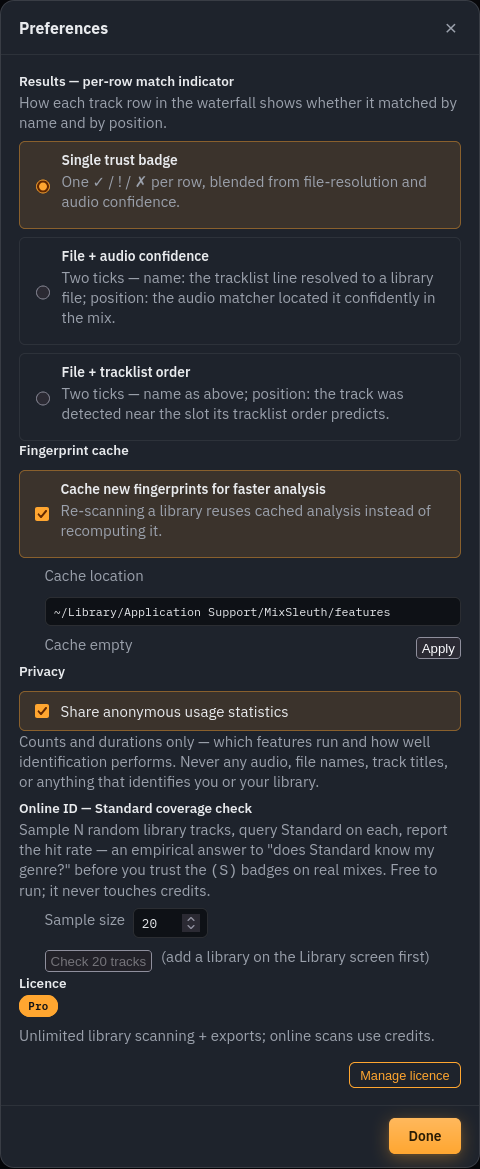
What's the per-row match indicator?
Each track row in the results waterfall carries two independent quality signals — did the name resolve to the right file, and is it playing where shown. Preferences lets you pick how that's displayed: a single blended trust badge (default), two ticks for file + audio confidence, or two ticks for file + tracklist order. Pick the one that matches how you check results; it changes nothing about the analysis itself.
What's the fingerprint cache, and can I move it?
Analysing a library track produces a compact acoustic fingerprint, and the cache keeps it so re-scanning your library is fast instead of recomputing everything. It stores analysis data only — never copies of your audio. You can point it at another disk: edit the location and hit Apply, and MixSleuth moves the existing cache for you (handy if your boot drive is tight). Turning it off works too; scans just recompute each time.
What does "Share anonymous usage statistics" send?
Counts and durations only — which features run and how well identification performs overall. Never any audio, file names, track titles, or anything that identifies you or your library. It ships on so we can see what to improve, and the checkbox turns it off in one click.
What's the Standard coverage check?
A reality check before you trust online identification on your genre: it samples N random tracks from your library, runs each through the Standard source, and reports the hit rate. Underground catalogues vary — a 90% hit rate on your collection reads very differently from 40%. It's free to run and never touches credits.
Where do I manage my licence from?
The Licence section at the bottom shows your current plan and a Manage licence button — same place as the plan pill in the header. Both open the licence sheet with your balances, credit packs, and the subscription management link.
Support & feedback
How do I contact support?
Email [email protected] — billing, licence trouble, anything. A human reads it.
How do I report a bug or suggest a feature?
Email [email protected]. Bug reports land best with the mix length, what you expected, and what happened instead. Feature ideas are very welcome — the roadmap has been shaped by them already.
Pricing details live on the pricing page; the fine print in our Terms and Privacy Policy.